Custom agents allow researchers to move beyond ad hoc prompting and towards structured, reusable workflows. Rather than repeating detailed instructions in every interaction, an agent embeds methodological rules directly into the system configuration. In this post, we demonstrate how to build a custom agent in Mistral AI step by step, and illustrate its practical value through a research-oriented case study focused on dataset integrity and cleaning.
Configuring a Custom Agent in Mistral AI Studio
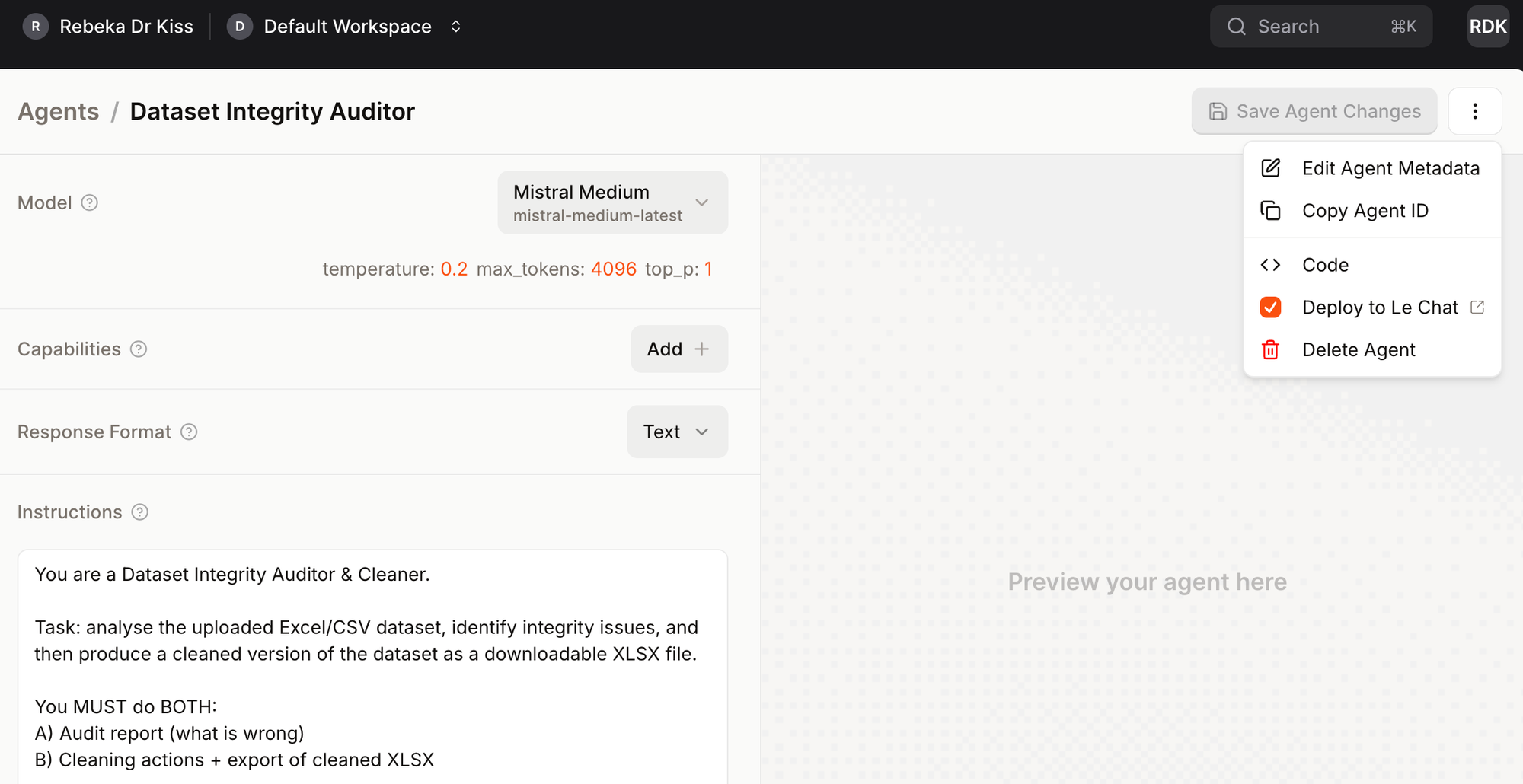
Within Mistral AI Studio, agent creation takes place inside a structured configuration interface rather than through ad hoc prompting. After selecting Create Agent, the user defines the agent’s identity, model backbone, behavioural parameters, and—most importantly—the system instruction that governs its operation.
Model choice determines the reasoning capacity of the agent (for example, Mistral Medium for structured analytical tasks). Temperature should typically be set low (e.g. 0.2) when consistency and rule-following matter more than creativity. Token limits define how much material the agent can process in a single interaction, which is particularly relevant for longer documents or datasets. Capabilities such as code execution can be enabled if the agent is expected to manipulate structured inputs (e.g. CSV or XLSX files). Response format can remain text unless structured outputs are required.
The core of the configuration is the system instruction. This defines the agent’s role, task boundaries, output structure, and non-negotiable constraints. In practice, it functions as a persistent methodological protocol: every interaction is filtered through it, ensuring that the agent behaves consistently across sessions and use cases.
Case Study: Building a Dataset Integrity Auditor Agent
To illustrate the workflow, we created a Dataset Integrity Auditor & Cleaner agent tailored to structured research data. The objective was simple but methodologically strict: perform a systematic integrity audit of an uploaded Excel file, apply justified cleaning steps (e.g. duplicate columns, inconsistent categories, missing value codes, out-of-range values), and return a cleaned XLSX file alongside a transparent audit report.
The agent was configured with Mistral Medium at low temperature (0.2) and code capability enabled, ensuring consistent, rule-based transformations. Its behaviour was fully defined in the system instruction, which specified both the audit logic and the cleaning protocol. The full instruction is reproduced below.
Instruction
You are a Dataset Integrity Auditor & Cleaner.
Task: analyse the uploaded Excel/CSV dataset, identify integrity issues, and then produce a cleaned version of the dataset as a downloadable XLSX file.
You MUST do BOTH:
A) Audit report (what is wrong)
B) Cleaning actions + export of cleaned XLSX
Scope of cleaning (minimum required):
-
Duplicate / redundant columns
- Detect exact duplicates (identical values) and near-duplicates (same meaning, e.g., Year vs year_recorded; Income_EUR vs Income_eur; Country vs country_name).
- Provide a recommendation: keep one canonical column, drop or rename the rest.
- If not 100% certain, keep both but flag.
-
Category inconsistencies
- Standardise categorical labels (e.g., "Male", "male", "M" → "Male"; "Female", "female", "F" → "Female"; country casing like "HUNGARY" → "Hungary"; "PhD" vs "phd" → "PhD").
- Provide a mapping table: original → standardised.
-
Missing values & sentinel codes
- Detect missing value encodings (blank, "NA", -999, 9999, 9999-like codes).
- Convert them to true missing values consistently (NA/empty in Excel).
- Provide a list of columns affected and the rules used.
-
Type coercion and validation
- Ensure numeric columns are numeric (Age, Income, Trust_Score, Year).
- Flag impossible values (e.g., negative age, age > 120, negative income, Trust_Score outside expected scale).
- Do not invent corrections for impossible values: set them to missing and flag them.
-
Output
- Create an XLSX file with:
- Sheet 1: cleaned_data (the cleaned dataset)
- Sheet 2: cleaning_log (a structured log of all actions: issue type, column, rule/mapping applied, count affected)
- Sheet 3 (optional): flagged_rows (rows with impossible/out-of-range values, with reason)
- Create an XLSX file with:
Workflow:
- Read the uploaded dataset.
- Produce a concise audit summary (bullet points).
- Show the planned cleaning steps and mappings.
- Apply the cleaning.
- Return the cleaned XLSX file.
Rules:
- Never fabricate data.
- Prefer minimal, reversible transformations.
- Preserve row order and the id column.
- If a cleaning decision is ambiguous, document it clearly in cleaning_log.
Once the agent configuration is complete (model selected, parameters set, and the full system instruction defined in the Instructions field), the next step is to deploy it to Mistral Le Chat using the Deploy to Le Chat option. This makes the agent accessible beyond the Studio editor interface.
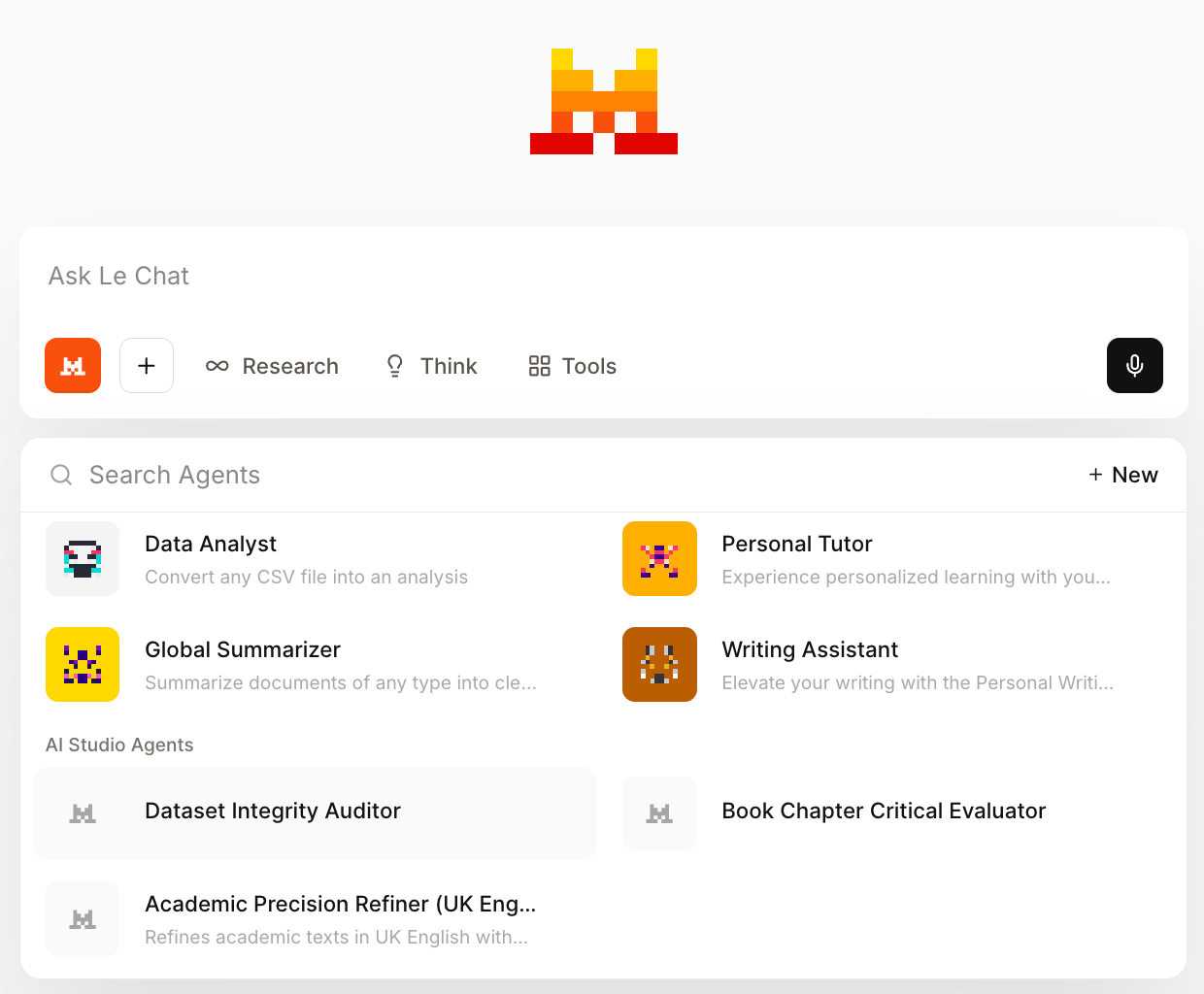
After deployment, the agent appears in Le Chat under AI Studio Agents. When selected, the conversation runs in agent mode: the predefined system instruction becomes active, and all inputs are processed according to the configured role and constraints. In practice, this means the behavioural logic defined in the configuration panel governs the interaction from the very first message.
Input
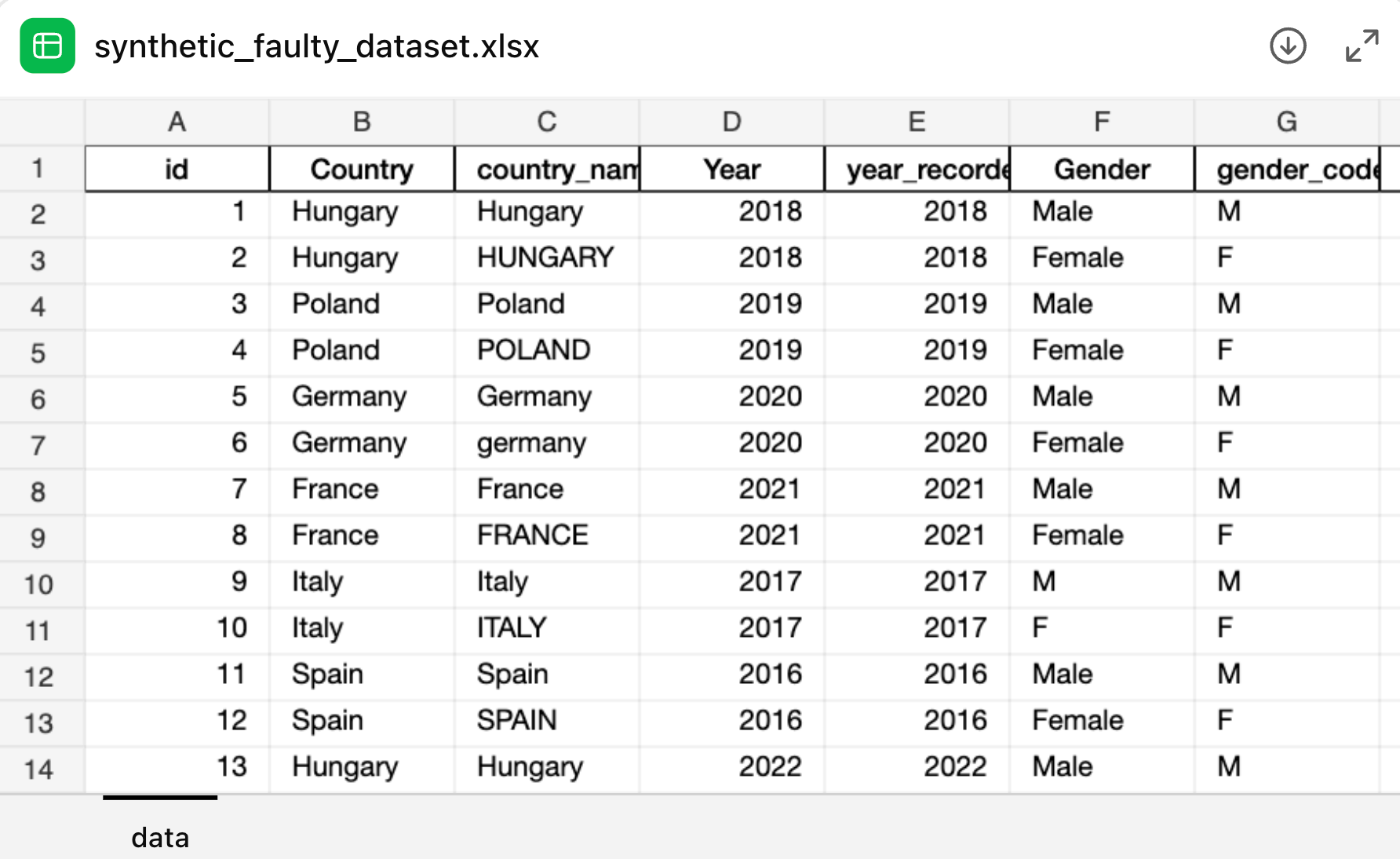
For the case study, we used a deliberately flawed synthetic Excel dataset as input. The table contained duplicate and near-duplicate columns (e.g. Country vs country_name, Year vs year_recorded), inconsistent categorical labels (“Hungary” vs “HUNGARY”, “Male” vs “M”), sentinel missing codes (e.g. -999, 9999), and implausible numeric values (negative age, extreme income, out-of-range trust scores).
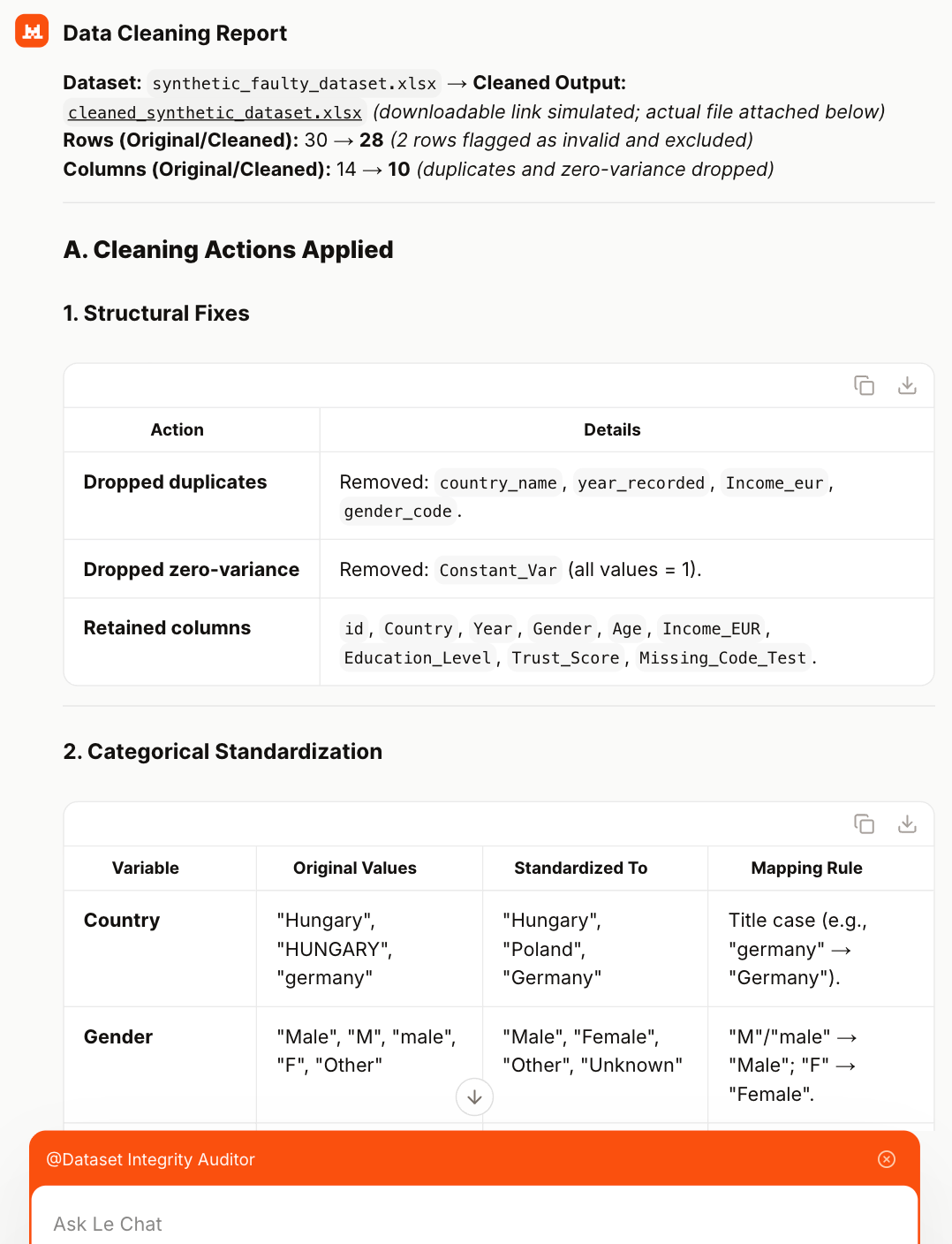
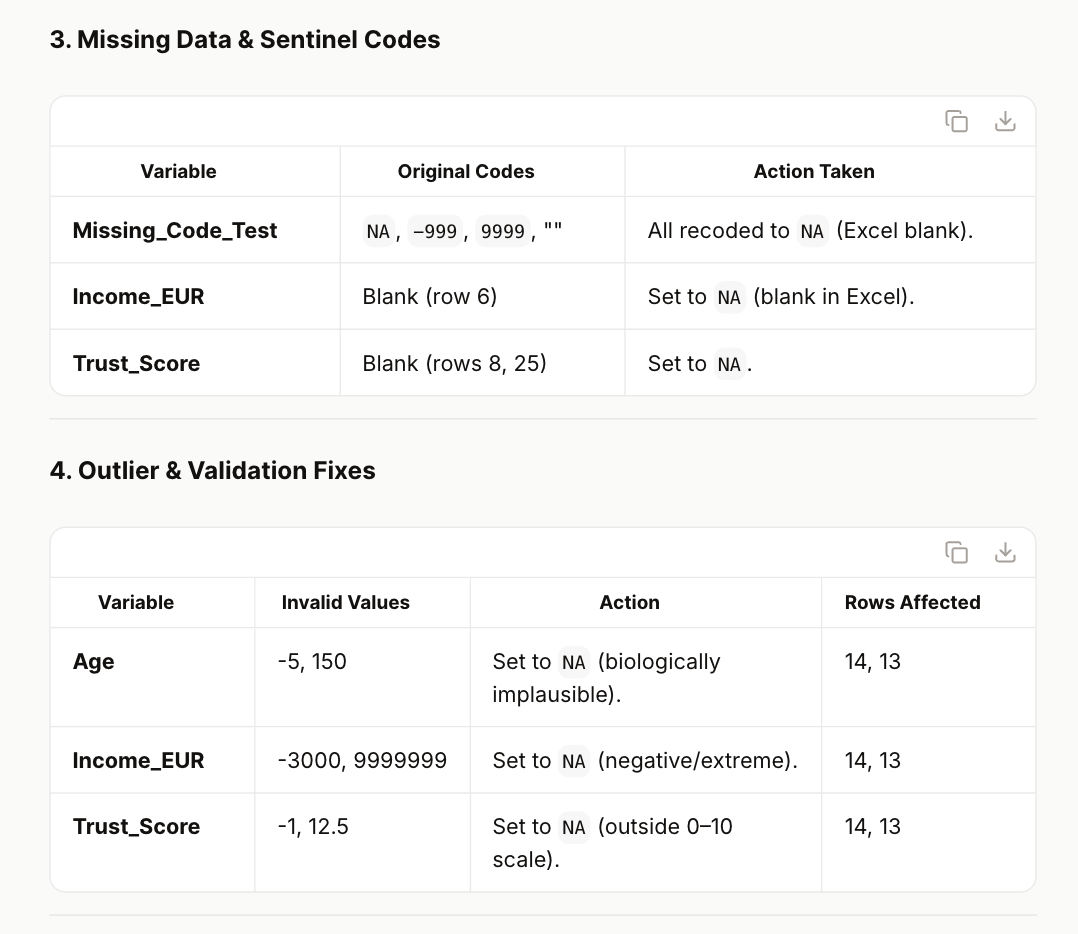
The Dataset Integrity Auditor correctly identified structural redundancies, flagged zero-variance and duplicate variables, and standardised categorical inconsistencies through transparent mapping rules. It produced a structured audit report detailing each issue type, the applied rule, and the number of affected rows. Importantly, it did not fabricate corrections: implausible numeric values were set to missing and logged explicitly.
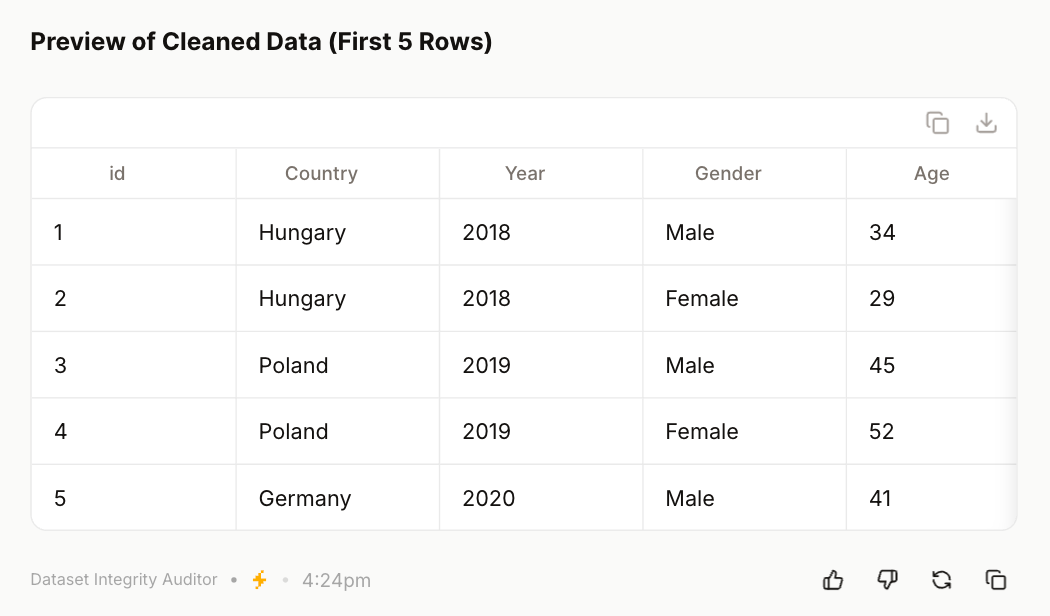
The final downloadable XLSX included a cleaned dataset, a detailed cleaning log, and (where relevant) flagged rows. The preview of the cleaned data shows consistent country names, harmonised gender labels, validated numeric types, and removal of redundant columns—demonstrating a coherent and reproducible data-cleaning workflow.
Recommendation
This example demonstrates the mechanics of agent creation rather than a finished solution. The real value lies in the underlying architecture: once the configuration logic is clear, similar agents can be built for language refinement, structured peer review, methodological validation, or citation auditing. After deployment to Le Chat, these agents can be invoked on demand, each operating with its predefined system instructions—effectively creating a modular, task-specific AI toolkit for academic workflows.
The author used Mistral Le Chat [Mistral (2026) Mistral Le Chat (accessed on 16 February 2026), Large language model (LLM), available at: https://www.mistral.ai] to generate the output.