
Claude Code is Anthropic's command line-integrated agent that runs directly on your computer, enabling terminal-based interactions with local files and applications. While the name suggests technical complexity, Claude Code is surprisingly accessible—offering the same conversational interface as chat-based models, but with the ability to execute code and interact with local files without any uploads. In this tutorial, we demonstrate how to set up Claude Code and use it to query a collection of PromptRevolution articles stored as JSON files—a workflow similar to our recent RAG implementation in Claude Projects, but without requiring any file uploads.
What You'll Learn
By following this tutorial, you will:
- Install and configure Claude Code on your local machine
- Set up directory access and model selection
- Run natural language queries against local files
- Understand the security considerations and token usage implications
In our simple installation guide, we focus on macOS-based system, following the official installation manual. Steps for alternative operating systems can be accessed under the same link.
Prerequisites
Before beginning, ensure you have:
Technical Requirements:
- macOS, Linux, or Windows with WSL (Windows Subsystem for Linux)
- Terminal access with the OS-specific installation programme (curl or irl) installed
- Active internet connection for installation
Account Requirements:
- Active paid Anthropic account
Knowledge Requirements:
- Basic familiarity with using terminal/command line
Installation Steps
Step 1: Run the Installation Script
Open your terminal and run the installation command:
curl -fsSL https://claude.ai/install.sh | bash
This downloads and executes Anthropic's official installation script. You should see output similar to:
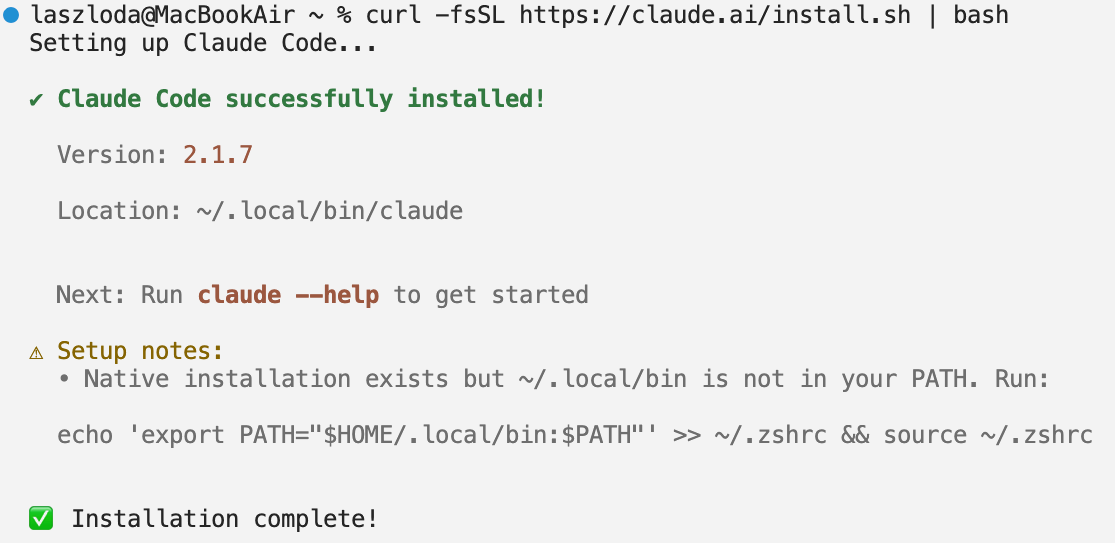
Note that in our case, the Setup notes highlighted an issue with our installation and suggested a possible solution. Following this, our installation was completed successfully. You should mindful of similar error messages. If you encounter any problems that the displayed tips do not solved, it may be worth consulting this link for official troubleshooting tips.
Step 2: Initial Setup and Authentication
Choose a working directory, where you would like to use Claude Code.
For this demonstration, we used a directory containing 122 PromptRevolution articles, each stored as an individual JSON file named after its URL slug. (This setup mirrors our recent Claude Projects RAG test, where we evaluated retrieval accuracy across the same article collection.)
We navigate to this directory with the following command:
cd "PATH_TO_THE_FOLDER"
Then, we launch Claude Code by typing:
claude
On first launch, you'll be prompted to make the following set-up choices:
- Style selection - The programme will first prompt your select the style you want to use in your environment
- Authenticate your account - This will open a browser window to log in to your claude.ai account, for chat-based subscriptions, or the Claude Console account for API-based usage
- Select a model - Choose from available Claude models (we used Opus 4.5 for this demonstration)
- Allow directory access - After issuing security warnings (discussed in more detail below), Claude will ask whether you trust files in your current directory
The directory trust prompt, in particular, looks like this:
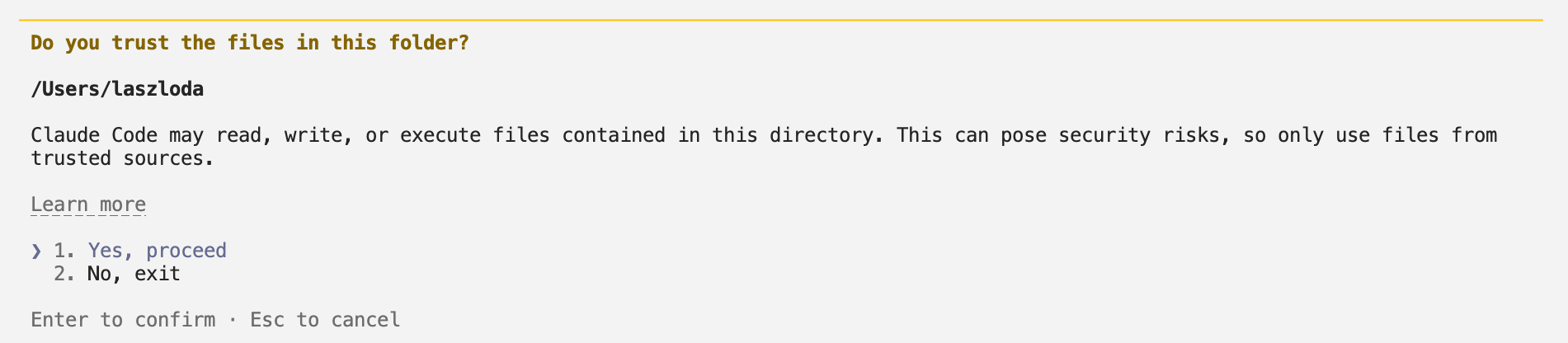
Security consideration: Only proceed if you trust the contents of the directory. Claude Code will have access to read and modify files within the chosen directory and its subdirectories.
After setup an image similar to this should follow:

Demonstration: Querying Local Article Files
In the following, we demonstrate Claude Code's ability to retrieve information from the working directory.
Query 1: Basic File Count
First, we ask it to count the files saved in the directory:
Prompt:
Can you tell me how many files are saved in the working directory?
Claude's Response:

Claude Code executed a bash command (ls -1 | wc -l) to count files, then reported the result in natural language. The interface shows both the technical step taken and the interpreted answer.
Query 2: Content-Based Article Lookup
Next, we implement the same question asked in our recent Claude Projects RAG test:
Prompt:
Which model did we use in the Building a Retrieval-Augmented Generation (RAG) System for Domain-Specific Document Querying article?
Claude's Response:
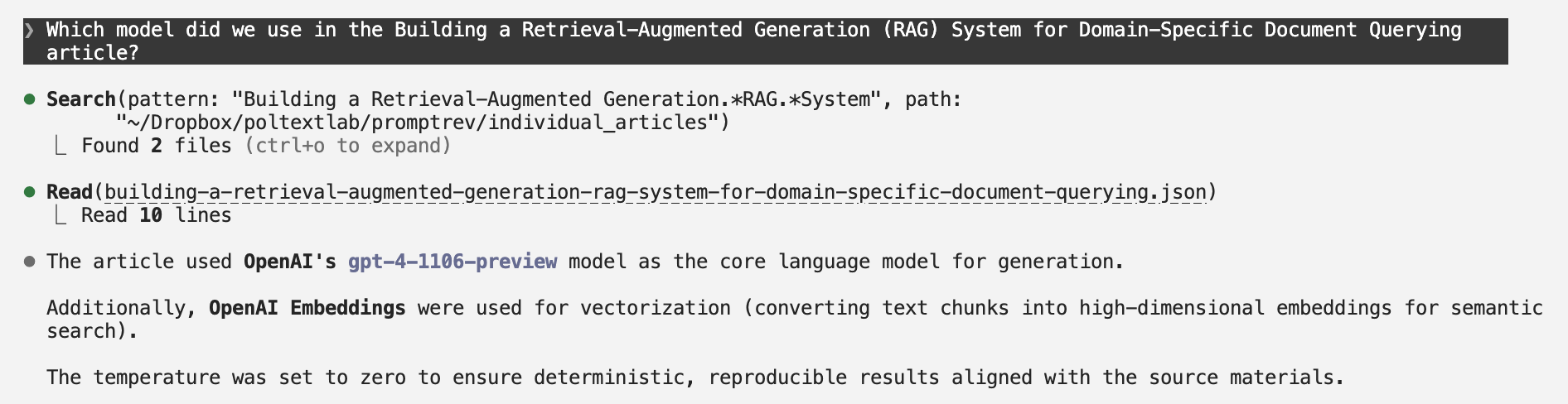
Claude Code performed a semantic search to identify the relevant file, then read its contents to extract the specific model information. The response includes contextual details beyond simple keyword matching—demonstrating genuine content understanding.
Query 3: Cross-File Analysis
We followed with questions from our earlier demonstration:
Prompt:
Please list all articles where we used API. Mention only articles where it was actually part of the demonstration and not only mentioned.
Claude's Response:
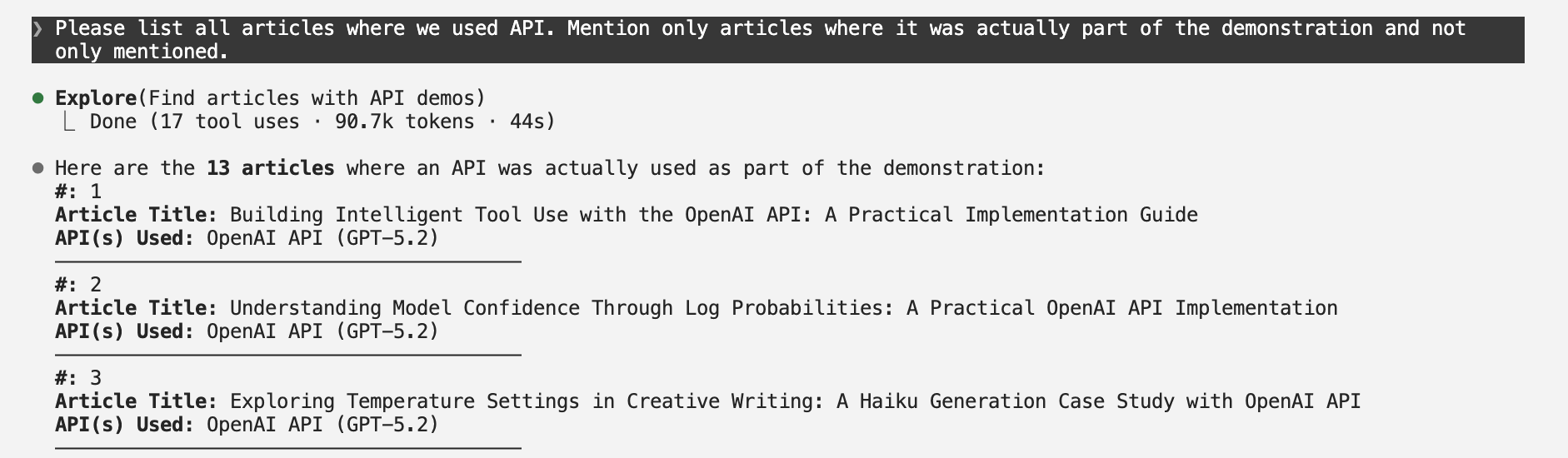
With the full list including 13 articles. This query required Claude to:
- Search across all 122 files
- Distinguish between articles that merely mentioned APIs and those that demonstrated API usage
- Extract and categorize results by API provider
- Present findings in a structured format
The accuracy was high, with the only potential classification question being whether locally-run Ollama should be categorized under "API."
Understanding Claude Code's Behaviour
Permission Requests
Claude Code frequently asks permission before executing commands. A typical prompt looks like:
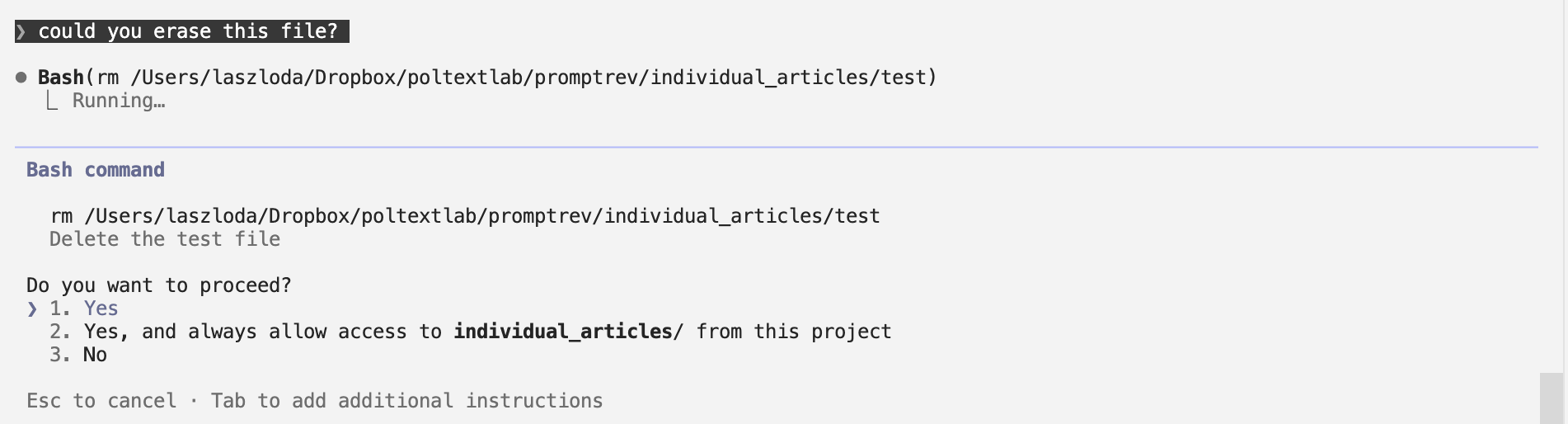
⚠️ Important Security Note: Claude Code can read, write, and execute files in directories you grant it access to. Summaries such as "Delete the test file" may help you interpret the steps proposed by Claude, but to use the agent fully securely, you should make sure that you understand the proposed command before approving it. If you cannot assess whether a command is safe, it may be better to not proceed.
Token Usage Considerations
Local file queries can consume significantly more tokens than typical chat interactions because Claude may need to read multiple files to answer a single question. In our demonstration, the last step of looking for API-focused articles used 90,700 tokens, which is about 30 times as long as this entire article. Users on rate-limited plans should be mindful of this when working with large file collections.
Key Takeaways
Accessibility: Despite its name and terminal-based interface, Claude Code is nearly as conversational as chat-based models. Users comfortable with basic command-line navigation can quickly adopt it.
Security Trade-off: The convenience of local file and application access comes with increased risk. Claude Code can execute arbitrary code in your working directory, making it essential to:
- Only use trusted directories
- Review proposed commands before approving them
- Understand the implications of file operations
For most research workflows involving local file querying, Claude Code provides a powerful, privacy-preserving alternative to cloud-based RAG systems—provided users understand and can manage the security implications of granting code execution access.
The authors used Claude Opus 4.5 [Anthropic (2025) Claude Opus 4.5, Large language model (LLM) (accessed on 14th January 2026), available at: https://claude.ai] to generate the output.